Inside our law firm demo: a case review form that does the first interview
A woman sits in her car after a crash. Her hands are still shaking. She opens her phone and looks up a lawyer. What she needs most is not a long page of text. She needs one clear next step.
Our law firm demo is built around that moment.
First, the plain truth. The firm on this demo, Whitfield & Associates, is made up. We run it as a demo, at newvibecitylaw.com. No lawyer there is real, and no case on it ever happened.
What a visitor sees
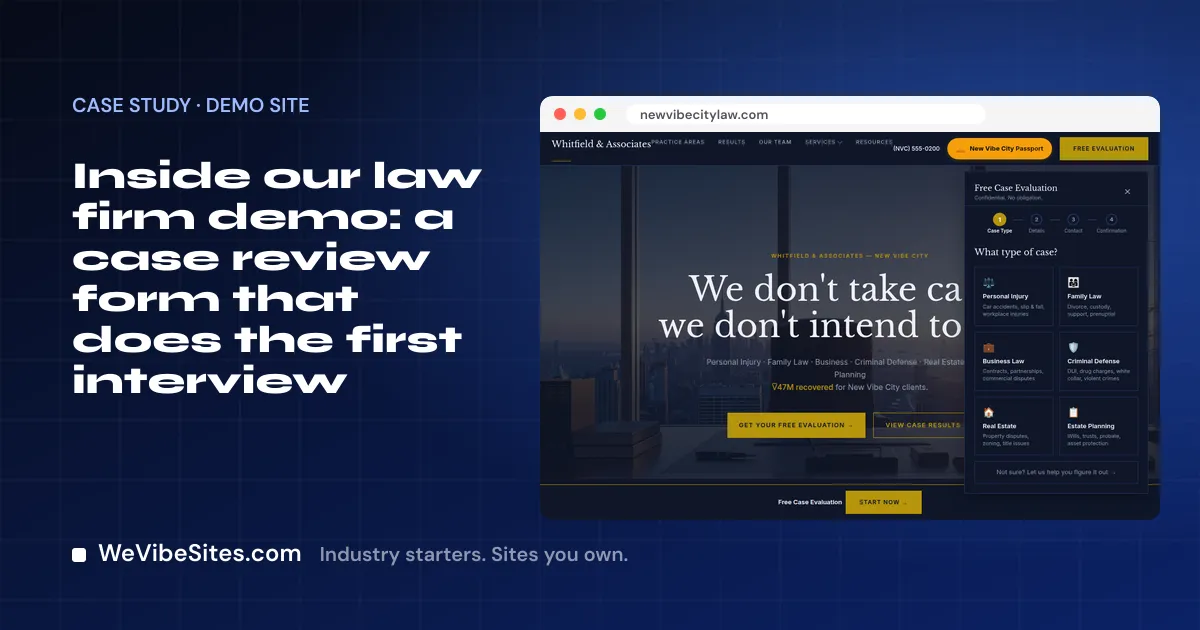
The top of the page says who the firm helps and offers a free case review. Below that are the practice areas: injury, family law, business, criminal defense, real estate and estate planning. Each one lists the kinds of cases it covers and links to its own page.
Then comes the part we like best. The case review is not one long form. It is a few short steps:
- Pick the kind of case, with a short note under each so people know where they fit.
- Say when it happened, and add a few words if you like.
- Leave your name, phone and email, and pick how and when you want a call.
- See a clear page that says what happens next.
There is also a "not sure?" link for people who do not know what kind of case they have. A scared person can get help picking.
The page also shows a team section, some free tools, and a "how we work" list in five plain steps.
What on the demo is not real
Some of what you see on the demo is there to show a look, and nothing more. It shows big dollar totals, case wins and client quotes. Those are all made up, like the firm.
On your site, none of that goes up unless it is true. Client words and results appear only with permission, in the words you give us. We never make up lawyers, wins or quotes.
The same goes for the tools. Things like the case value tool and the referral partner page are shown on the demo. They are not included unless they are on your Launch list.
How it was built
We built this demo by vibe coding. We told the site what we wanted, in plain English, and an AI tool made the change. A person checked each one.
You will change your own site the same way. Say you start taking a new kind of case. You type "add a page about dog bite cases." Or you want the form to ask one more thing: "ask if they have a police report." The change shows up. On the call, you make one real change like this, with us beside you.
What a real firm gets
A Launch is $2,500, paid once. You get two hours of live building with one of our people. If you want them, we set up and test:
- A case review form that sends each request to the inbox you name.
- Online booking for consults, with your Google or Microsoft calendar.
- Payments for consult fees, into your own Stripe, PayPal or Square account.
- A client portal, where clients sign in with a code we email them and see their files.
- One contact list, so every form and booking becomes a contact.
Your site shows where you practice and says it is not legal advice. A chat box is there if you want it, and it answers only from facts you approve. If it does not suit your firm, leave it off.
The site runs in your own Replit account. We charge $0 a month, and your host bills about $20 US a month for use. You own the code.
Take a look
Visit the demo and try the case review. Then read about the Law Firm starter or start your Launch. Want to talk first? Book a free call.